Your photos came back. Half of them will not open.
The problem
The recovery tool finishes, and its job is done. What you are left with usually looks like this:
- 8,000 files "recovered"
- 3,000 of them will not open, or open to "file appears to be damaged"
- 2,000 are duplicates of photos you already have
- every file is named 00000001.jpg and dated today
Nobody handles this step. There is no free tool that does it, doing it by hand takes hours, and you are already having a bad day. This tool does exactly this step.
What it does
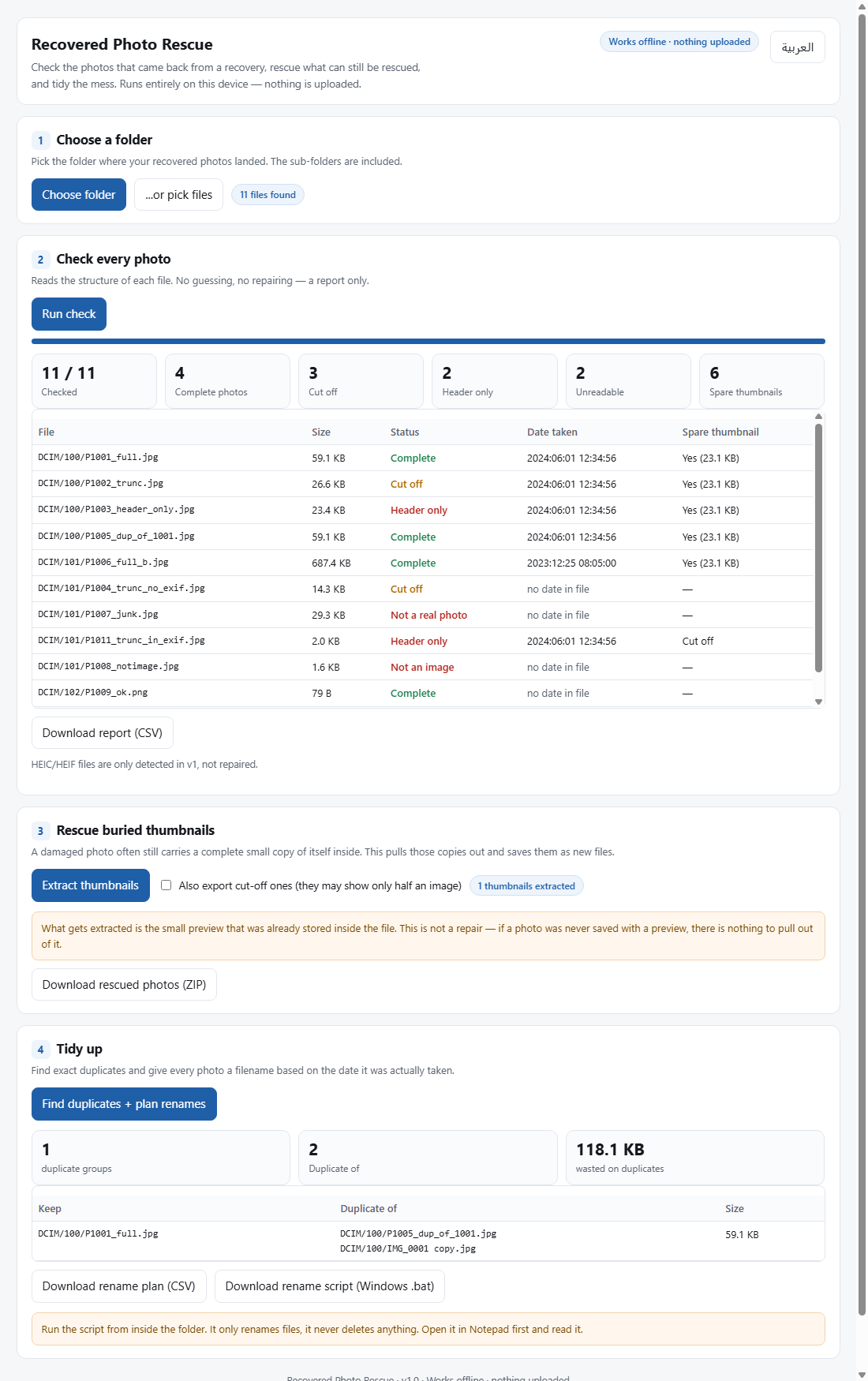
1. Health check
Reads the real file structure of every photo and sorts it: intact / truncated / header only / not a photo. Export the result to a CSV you can keep or hand to a lab.
2. Rescue the embedded thumbnail
Most JPEG files carry a small copy of themselves inside. When the main image is cut short, that small copy is very often still complete. The tool pulls it out as a real, openable JPEG.
3. Sorting and renaming
Finds duplicates by comparing file content, not file names, and builds a rename plan from the real capture date in EXIF. Nothing is renamed until you approve the plan.
How it works
One ZIP file. Unzip it, open the single HTML file inside. It runs in your browser against a folder you pick.
- no installer, nothing to set up
- no account, no sign-in
- no internet needed - and it cannot upload, because there is no server in it
What it does not do
- It cannot invent pixels that were never written. If a photo is truncated and carries no embedded thumbnail, there is nothing to rescue.
- It does not deblur, upscale, or colour-correct. It is not an enhancement tool.
- Version 1 handles JPEG and PNG. HEIC files are detected and reported, not processed.
- It uploads nothing. That is our promise, and it is also a technical fact: there is no code in it that sends anything anywhere.
Price
$19, one time
Or: the Emergency Kit ($14) together with this tool for $29.
Buy now - $19Frequently asked
Does it upload my photos?
No. There is no server in the tool and not one line that sends a file. Unplug your network and it still works.
Will it overwrite my originals?
No. It only reads. Everything it produces goes into a new folder, and the rename plan is shown before anything is applied.
Does it work on Mac and Linux?
Yes. Any system with a modern browser. There is no installer.
How many photos can it handle?
Thousands, comfortably. The limit is your machine memory, not the tool. For tens of thousands, split the folder into batches.
What about HEIC files from my phone?
They are detected and listed in the report, but version 1 does not process them.
Can I get a refund?
Yes, within 14 days. Payment is handled by Creem as merchant of record.